





UNIT 616 6/F KAM TEEM INDUSTRIAL BUILDING 135 CONNAUGHT ROAD WEST SAI WAN HONGKONG.
Copyright © 2026 NOVABEYOND LIMITED (company number 2833487). All rights reserved.
Introduction
A planned Kwai campaign can stall before the first impression: company details do not match the application, the media buyer cannot access the advertising account, or the team discovers that conversion tracking is not ready. These problems turn account opening into a launch bottleneck.
Kwai agency ad account setup should connect business verification, authorized access, billing, and campaign preparation. The value of a Kwai agency is the work it coordinates across those steps, not simply delivery of a login.
This guide explains what an agency-supported arrangement includes, how to prepare the application, and what to verify in Kwai Ads Manager before spending. It also separates advertiser registration from a personal Kwai account and creator monetization, so your team starts in the right place.
Review your Kwai account setup requirements with Novabeyond
Quick Answer
To complete Kwai agency ad account setup, confirm your advertiser entity, target markets, and product category; authorize the agency; prepare consistent company and website or app information; submit the requested materials; and resolve review questions. After approval, confirm account access, payment arrangements, and conversion tracking before launch. Start with the official Kwai for Business contact route or your verified agency contact. A successful Kwai sign up does not by itself establish that an advertising account is approved or assigned to you. Keep separate checks for registration, advertiser approval, Ads Manager access, and ad review.
What Is a Kwai Agency Ad Account?
A Kwai ad account is your working environment for creating paid campaigns, managing budgets, and measuring results. An agency ad account arrangement adds authorized support with onboarding and, where agreed, campaign operations.
Kwai's advertising platform terms require anyone placing ads for a third-party advertiser to have authority to act on that advertiser's behalf. An agency-supported arrangement is not the purchase or rental of another business's account.
Benefits of Kwai Agency Ad Account Setup
The practical benefits come from defined responsibilities:
Document preparation: check that the legal entity, business details, and advertised offer tell the same story.
Onboarding coordination: organize submissions, requested corrections, and communication with the platform.
Operational support: clarify billing, access permissions, reporting, and tracking responsibilities.
Campaign guidance: review local-language creative, measurement readiness, and early performance.
Ask which services are included and which require separate work. Approval timing, credit terms, spending limits, and access to particular products must be confirmed for the actual arrangement.
Comparing an Agency Ad Account Arrangement with Self-Managed Operations
Kwai's public business site addresses both advertisers and agencies. Confirm the available onboarding route for your market rather than assuming every advertiser receives the same registration experience. The useful comparison is who performs the work after that route is established.
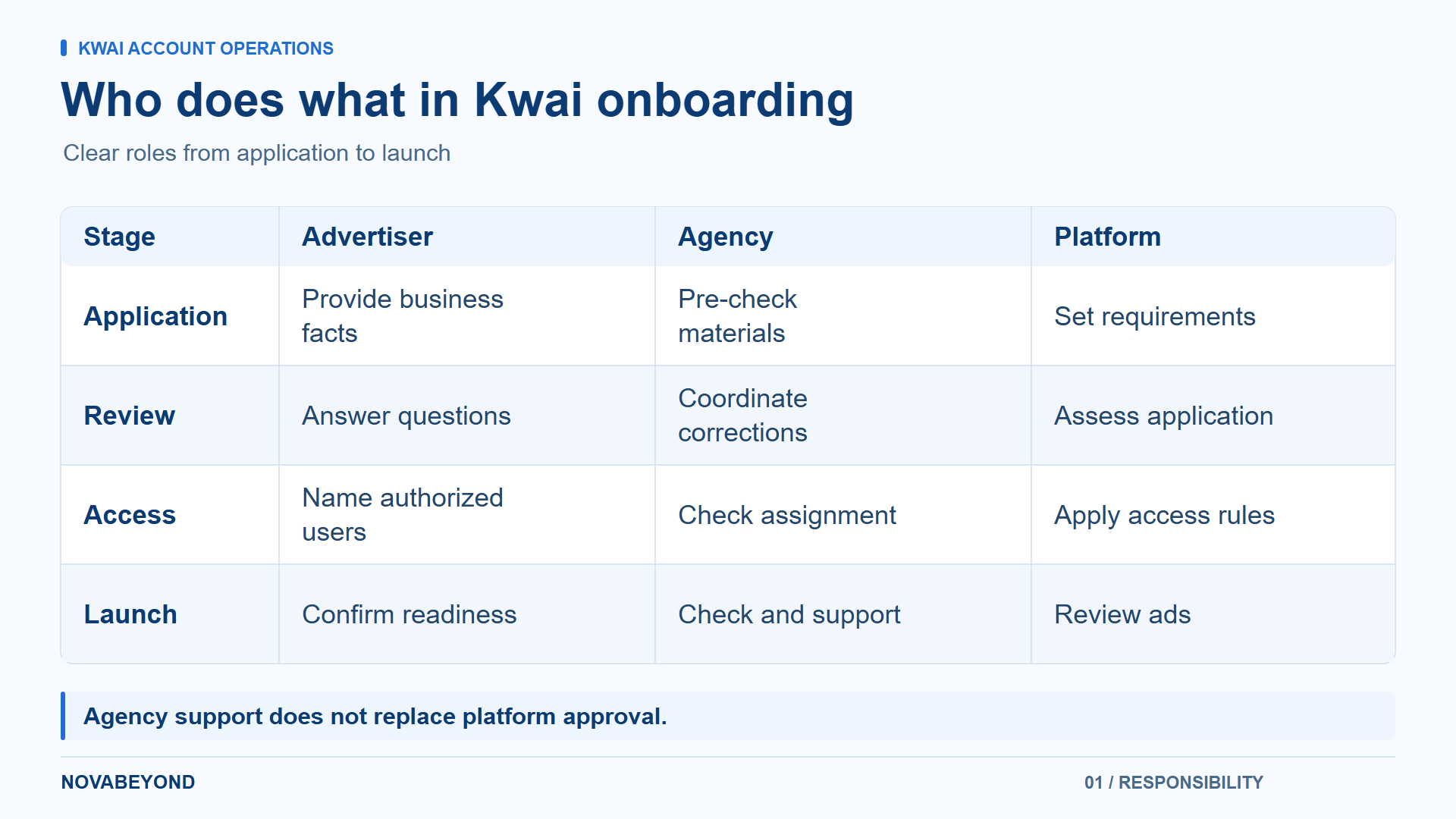
Responsibility | Self-managed operations | Agency-supported operations |
Application materials | Your team prepares and follows up | The agency helps pre-check and coordinate |
Campaign work | Your media buyers manage execution | Execution stays in-house or is delegated by agreement |
Billing | Your team manages applicable payment terms | Payment responsibilities and fees are agreed in writing |
Access and reporting | Your administrator manages users | Advertiser and agency agree access and reporting scope |
Compliance | Your team handles checks and corrections | The agency assists; platform review still applies |
For the general registration sequence, use our Kwai Ads account creation guide. Here, the focus is the agency relationship and the account handover.
Step-by-Step Guide: Kwai Agency Ad Account Setup
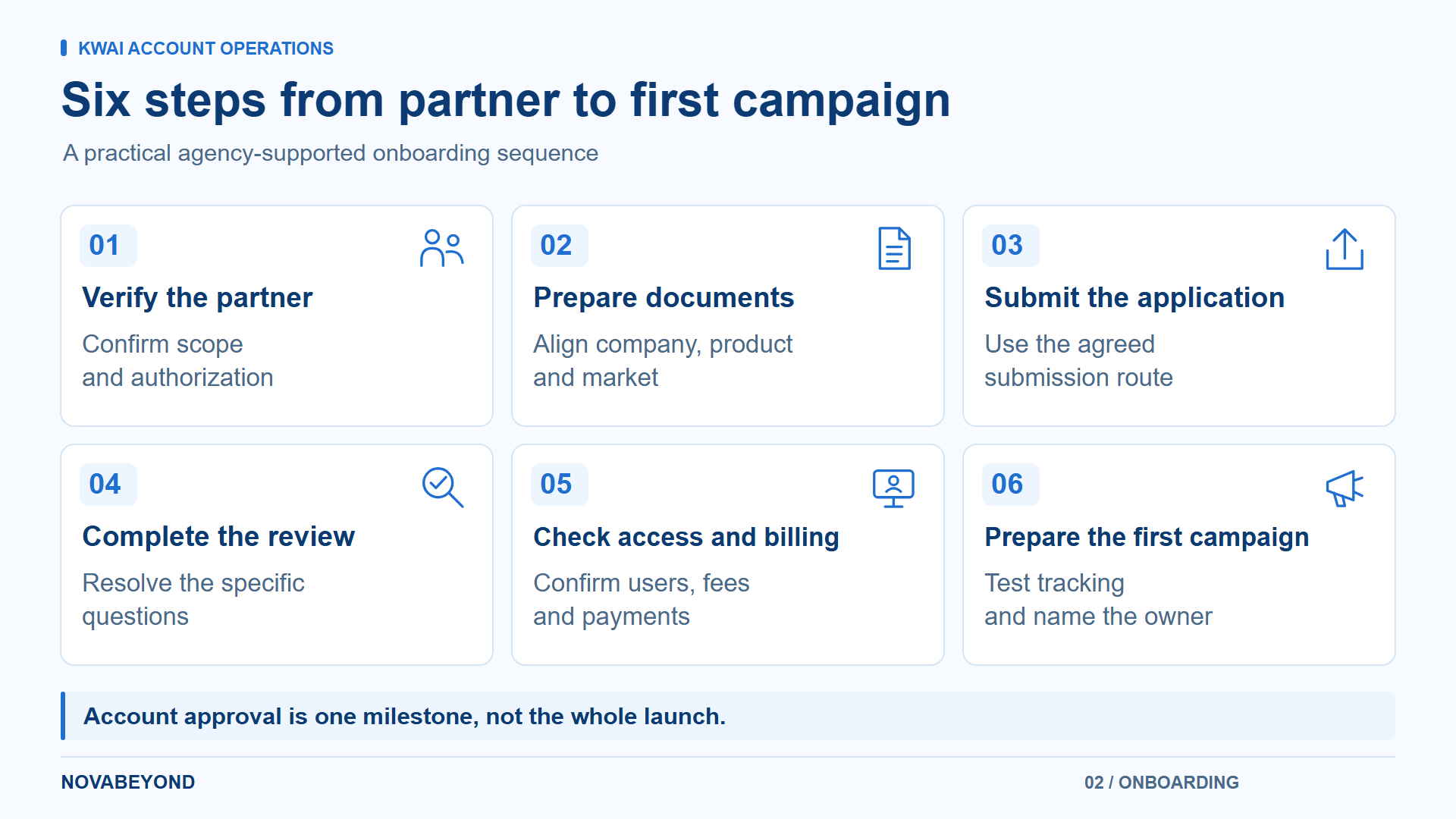
Step 1: Choose and Verify Your Kwai Agency Partner
Share your advertiser entity, product, target countries, website or app, campaign objective, and planned budget. Ask the partner to confirm whether it supports that combination and to substantiate any claimed platform authorization.
Agree who submits documents, handles review questions, manages campaigns, and provides reporting. Name a contact on each side. If you manage multiple clients, establish the account structure before collecting their materials.
Step 2: Prepare Business Documentation
Kwai's official advertising instructions request company information, a commercial license or certificate number, website, industry, target users, advertising expectations, budget, and decision-maker details. The page uses Brazil-specific examples, including CNPJ and Brazilian reais; confirm the equivalent requirements for your entity and market.
Prepare:
Company registration details and the supporting documents requested for your application.
A working company website, landing page, or app store listing.
A clear description of the product, industry, and intended audience.
Business contact and billing information consistent with the advertiser entity.
Brand authorization or category-specific qualifications where required.
Check names, document validity, and contact details before submission. Keep a dated copy of the submitted materials. Our advertising account document checklist can help organize the preparation across platforms.
Step 3: Submit the Application through the Agreed Route
The official Kwai for Business website provides a Contact Us route. For agency-assisted onboarding, follow the submission process confirmed by your partner and the platform.
Use an identifiable work email for the responsible user. Authorize the agency's role through the appropriate agreement and access controls. Keep passwords private rather than distributing a shared login.
Record the submitted entity, product, market, contact email, and application reference when provided. This gives everyone the same starting point if additional information is requested.
Step 4: Complete Verification and Compliance Review
Respond to the specific issue raised, such as unclear registration details or a mismatch between the business and the landing page. Correct the underlying information rather than submitting conflicting versions through different contacts.
Separate advertiser onboarding from ad review. An approved account does not mean that every future creative or destination is approved. Ask your partner what remains outstanding and which review stage the application has reached before setting a launch date.
Step 5: Activate Access and Confirm Billing
After approval, confirm that the intended users can access the correct advertiser account. Record its account ID, associated business, administrative contact, and reporting permissions.
Before funding, confirm the payment recipient, billing currency, applicable taxes, service fees, payment schedule, and balance settlement terms. Clarify whether any credit arrangement applies and how spending limits are handled. Kwai's platform terms place payment arrangements under the applicable insertion order or separate agreement.
Step 6: Prepare the First Campaign with Agency Support
Agree the objective, destination, target audience, creative assets, and test budget. Assign responsibility for tracking implementation and test the conversion action before launch.
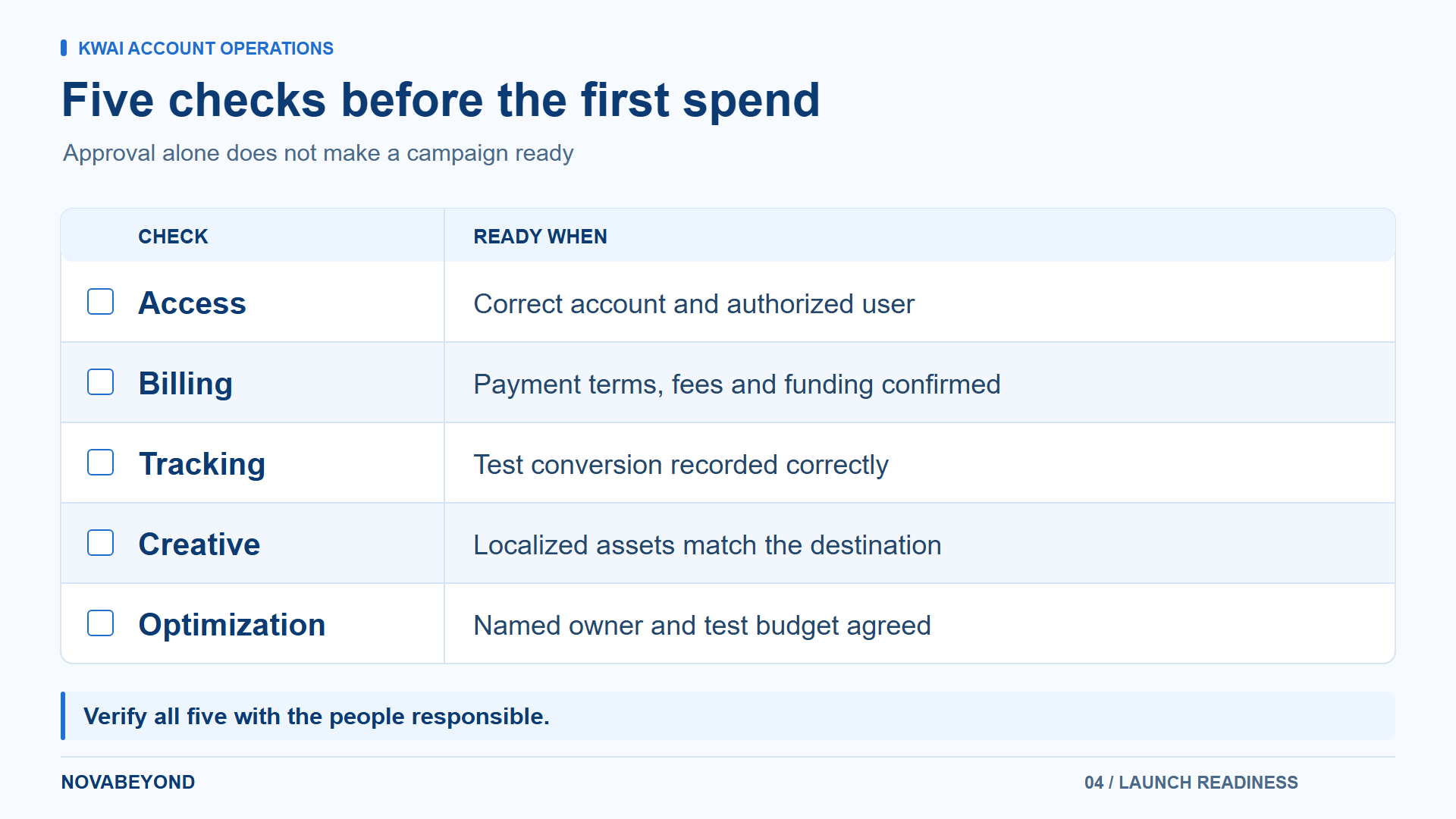
The handover should include working access, an agreed billing process, a measurement check, and a named person responsible for optimization. Account approval is one milestone; launch readiness requires all four.
[Image Idea: Six-step onboarding flow from partner verification and document preparation to review, access, and campaign readiness | Alt Text: ]
Plan your Kwai onboarding and launch handover with Novabeyond
Kwai Ads Manager Login, Sign Up, and Business Center Access
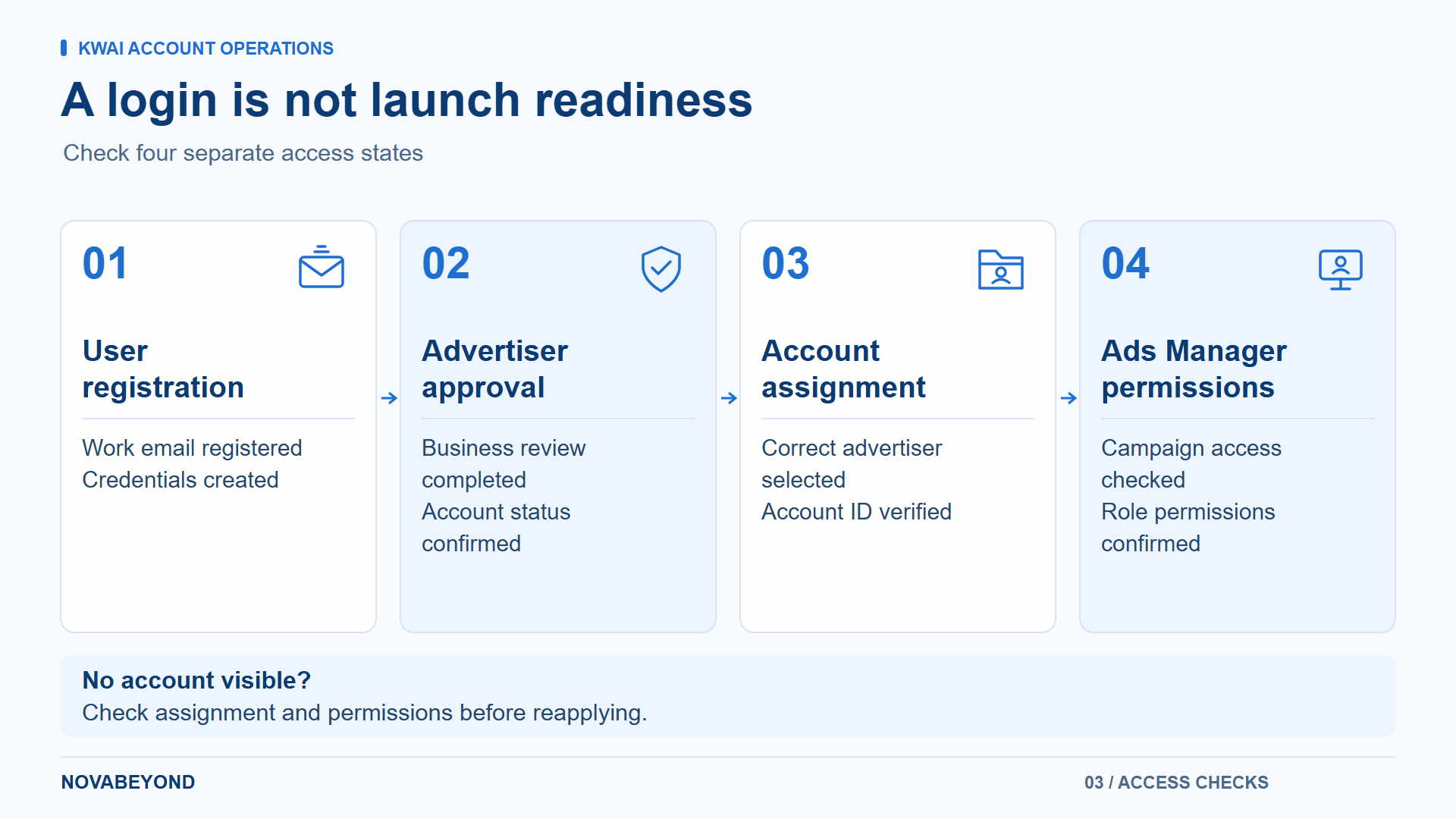
Kwai registration, advertiser approval, and access permissions solve different problems. Treating them as interchangeable is a common reason teams believe an account is ready when the media buyer still cannot use it.
Kwai Sign Up versus Advertising Account Approval
The public Kwai advertising login page displays email and password fields, a Sign up option, and password recovery. Registration creates access credentials; confirm the remaining business review and account assignment steps with your onboarding contact.
A personal Kwai app account is used for social activity and content. Do not assume that its login gives you access to the advertiser tools or that creating it completes Kwai Ads registration.
Check the Account Assigned to Your User
When your arrangement uses Kwai Business Center, confirm which advertiser account your user can access and how to reach its Ads Manager. Ask the administrator to verify the account ID and the permissions needed for campaign creation, reporting, and billing.
A successful login with no expected account visible calls for an access and assignment check. It does not establish that your business application was rejected. Avoid creating duplicate applications before the administrator identifies the issue.
Complete a Practical Access Handover
Have the intended media buyer verify these actions from their own authorized login:
Locate the correct advertiser account and confirm its business identity.
Open campaign management and create a draft where permitted.
View the reporting required for their role.
Locate the applicable billing or funding information, or confirm who supplies it.
Confirm access to the tracking asset needed for the campaign.
Document who can approve changes, add users, and handle a future agency transition. Agree what reports and assets can be handed over under the platform rules and your contract.
Best Practices for Successful Kwai Advertising after Setup
Validate Measurement before Buying Traffic
For website campaigns, confirm the required Kwai Pixel or supported integration, the intended conversion event, and whether a test action is recorded correctly. Check the destination, event meaning, and any value or currency data used in reporting.
For app campaigns, use the supported mobile measurement partner integration. The Kwai for Business app attribution documentation illustrates the need to configure data sharing, map relevant in-app events, and create campaign links. An install signal alone does not confirm that your purchase or registration event is being sent correctly.
Assign one owner to investigate discrepancies between platform results and your business reporting. Make sure the comparison uses consistent dates, attribution settings, and conversion definitions.
Localize Creative and Keep the First Test Readable
Prepare local-language creative that matches the offer on the destination page. Use appropriate permissions for music, images, and creator content. Confirm that the intended ad format is available for your campaign rather than assuming every product on the public business site is enabled in the account.
Start with a clearly defined conversion objective and a budget your team can monitor. Change one major test variable at a time so that results remain interpretable. Review CTR alongside conversion rate, CPA, and the quality of the acquired customers or leads.
Use our Kwai advertising strategy guide for broader planning once the account is operational. Novabeyond's Emerging Media Solutions connect onboarding with tracking preparation, localized execution, and ongoing optimization support.
Common Challenges and How Agencies Help Resolve Them
Application needs corrections. Compare the review request with the exact submitted entity, documents, and destination. Assign one person to maintain the corrected version and coordinate the response.
Kwai Ads login works, but account access is missing. Check the registered email, account assignment, and role with the administrator. Use official password recovery for a credential problem; use the account administrator for a permissions problem.
An ad is rejected. Kwai's advertising policy describes review of the creative, text, objective, targeting, and landing page. Check the rejection notice, correct the identified issue, and resubmit through the applicable process. If you believe the decision is mistaken, use the support route specified in the policy.
Spending or payment interrupts delivery. Confirm the balance, payment status, account restrictions, and applicable spending arrangements before changing bids. A delivery interruption is not automatically a creative-performance problem.
Clicks arrive without business results. Test the destination and conversion event, then inspect creative-to-offer consistency and traffic quality. An agency can coordinate these checks, but the diagnosis should follow the evidence rather than a generic instruction to increase spend.
FAQ
1. What documents are needed for Kwai agency ad account setup?
Prepare company registration information, the requested license or certificate details, website or app information, business contacts, industry, target markets, and budget. Submit additional authorization or category qualifications when requested. The exact checklist depends on the advertiser and market.
2. How long does it take to open a Kwai agency ad account?
The public official guidance reviewed does not establish a universal completion time. Ask for an estimate tied to your actual documents and review stage. Keep account approval, ad review, and launch preparation as separate milestones rather than treating a single estimate as a guarantee.
3. Do agency ad accounts automatically receive higher spending limits?
Do not assume so. Confirm spending limits, funding requirements, credit terms, and fees for the specific arrangement. Agency coordination can help your team understand and manage these conditions; it does not replace the platform's approval or the applicable agreement.
4. Can startups use a Kwai agency ad account?
Startups can discuss agency-assisted onboarding with a partner, subject to the applicable business and market requirements. Prepare the same consistent advertiser information and agree a realistic test plan. Company size alone does not establish eligibility or guarantee approval.
5. Can my team manage campaigns after an agency sets up the account?
Agree the operating model before submission. Your team may handle campaign work while the agency supports onboarding or other agreed tasks, provided the account permissions support that arrangement. Confirm access, reporting, billing responsibilities, and the process for changing users.
6. Can one Kwai ad account be reused for different clients?
Kwai's advertising policy requires a separate ad account for each advertiser or client and says not to change the advertiser associated with an existing account. Plan client separation during onboarding rather than reassigning an account from one business to another.
7. Is Kwai monetization the same as opening a Kwai Ads account?
No. Kwai monetization concerns creator earning programs, while an advertiser account is used to buy media and manage campaigns. Kwai monetization requirements do not replace advertiser onboarding. See our Kwai creator monetization guide for that separate workflow.
8. Why can I sign up for Kwai but not access Ads Manager?
Your credentials may exist before advertiser approval or account assignment is complete. Confirm that you are using the advertising login rather than the personal app, then ask your onboarding contact to check the advertiser account, registered email, and user permissions.
Conclusion
A complete Kwai agency ad account setup joins consistent business information, authorized agency support, working Ads Manager access, clear billing, and tested measurement. Keep those checks visible from application through launch.
Novabeyond helps advertisers coordinate emerging-media onboarding and campaign operations, with attention to the practical handover between business, finance, and media teams. The next step is to review your entity, target market, product, and launch requirements together.
more posts
TikTok Ads Rejected? 7 Common Policy Violations and How to Fix Them
November. 05 2026
LEARN MORE

Google Ads Suspended in 2026? How to Appeal and Unblock Your Manager Account
September. 20 2026
LEARN MORE
Swiftproxy Review 2026: Exploring Its Residential Proxy Features and Performance
July. 17 2026
LEARN MORE
Verified Agency Ad Account Provider | Stable Ad Accounts 2026
May. 25 2026
LEARN MORE